Git Cheat Sheet
GIT Cheat Sheet
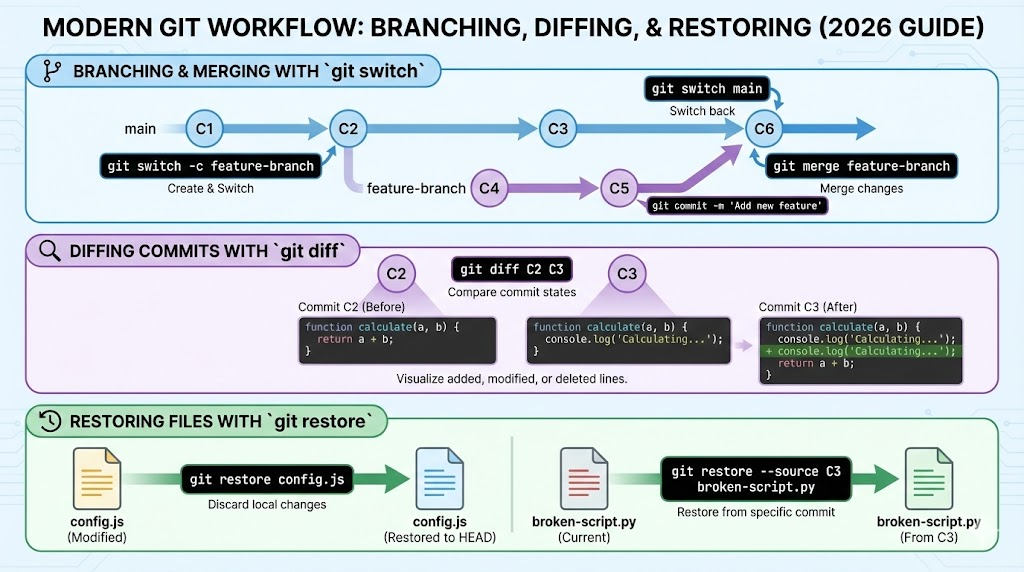
🚀 The Ultimate Git Cheat Sheet
Git is a powerful version control system that tracks changes in your code. Here is a breakdown of the most common and modern commands to keep your workflow smooth.
📂 1. Starting a Project
| Command | Explanation |
|---|---|
git init | Initializes a brand new local repository in your current folder. |
git clone [url] | Downloads an existing repository from a remote server (like GitHub). |
🛠️ 2. The Daily Workflow (Staging & Committing)
| Command | Explanation |
|---|---|
git status | Shows which files are changed, staged, or untracked. Check this often! |
git add [file] | Moves changes to the "Staging Area" (prepares them for a commit). |
git add . | Stages all changed files in the current directory. |
git commit -m "msg" | Saves your staged changes into the version history with a descriptive message. |
git diff | Shows the exact line-by-line changes that haven't been staged yet. |
🌿 3. Branching & Merging (The Modern Way)
| Command | Explanation |
|---|---|
git branch | Lists all local branches. |
git switch [name] | Moves you to a different branch. |
git switch -c [name] | Creates a new branch and switches to it immediately. |
git merge [branch] | Joins the history of the specified branch into your current one. |
git branch -d [name] | Deletes a branch (use -D to force delete if unmerged). |
☁️ 4. Working with Remotes (Syncing)
| Command | Explanation |
|---|---|
git remote add origin [url] | Links your local repo to a remote server. |
git push origin [branch] | Sends your local commits to the remote repository. |
git pull | Fetches updates from the remote and merges them into your current branch. |
git fetch | Downloads updates from the remote but does not merge them. |
⏪ 5. Undoing & Restoring
| Command | Explanation |
|---|---|
git restore [file] | Discards local changes in a file (reverts to last commit). |
git reset --soft HEAD~1 | Undoes the last commit but keeps your changes in the staging area. |
git reset --hard HEAD~1 | Undoes the last commit and destroys all changes. Use with caution! |
git log --oneline | Shows a condensed history of all your commits. |
💡 Pro Tips for Success
- Commit Often: Smaller commits make it easier to find bugs and revert changes if something breaks.
- Write Good Messages: Instead of "fixed stuff," try "Fix: Resolve login timeout issue."
- Pull Before You Push: Always
git pullbefore pushing to ensure you have the latest changes from your team.
Handy List GIT Tutorials